Salesloft tools for RevOps and Sales Ops
Keep Salesloft clean without the spreadsheets.
Bulk changes, fields that drift, enrichment spread across reps and tools: the jobs that land on RevOps every week. PulsarGTM does them inside Salesloft, with a preview before anything changes.
Not your team's Salesloft Admin? Send them the link
The same problems, every quarter
- Every bulk change means an export, a sheet of Salesloft IDs and a nervous click
- Last Connected dates, roll-ups and owners drift the moment someone forgets
- Each rep enriches in a different tool, so nobody knows what was spent or found
- Data vendors get renewed on hit rate, not on whether their numbers connect
Each problem, and the product that fixes it
All in one plan, on one Salesloft connection. Switch on only what you need.
"Can I see what this file will change?"
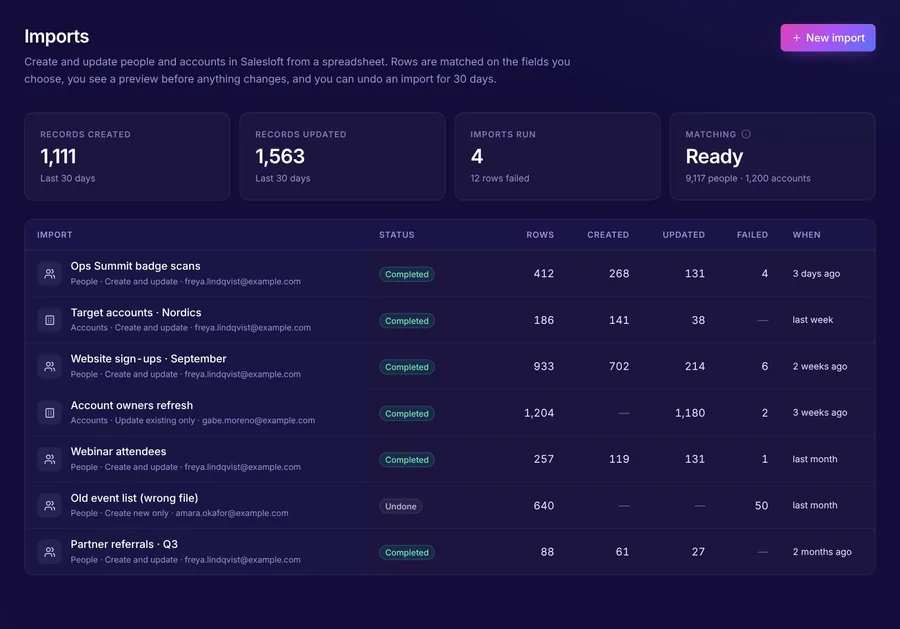
Imports with a preview and undo
Match on email, domain, CRM ID or LinkedIn, see every change before it's written, and undo for 30 days. Or connect a Google Sheet, webhook or Clay table.
Pulsar Import"Can these fields keep themselves up to date?"
Fields with no rules to maintain
Last Connected, Pitched and Booked dates, roll-ups from people to accounts, cadence flags and owner matching, filled from past calls on day one.
Pulsar Automate"Can enrichment run in one place?"
One waterfall, your own keys
Your providers in your order, run when people join a cadence, with every find logged by provider, step and cost.
Pulsar Enrich"Which data is worth paying for?"
Sources judged on connects
Connect rate, bad-number rate and credits per connect for every provider and list you import.
Pulsar ConnectFrom connecting Salesloft to the first fix
Connect Salesloft
A Salesloft Admin pastes an API key. Your data loads in the background.
Read the health check
A score out of 100, with the fix for each gap: duplicates, bad numbers, missing data.
Fix the first thing
Switch on a Smart Date, run your first import with a preview, or build a waterfall.
Questions from RevOps and Sales Ops
Does it change our CRM?
How much of our Salesloft API allowance does it use?
Who can sign in?
Can we undo a mistake?
See what needs fixing in your Salesloft
The free health check finds duplicates, bad numbers and missing data in a few minutes, and only reads your data. 30 days free, no card.
Rather have a walkthrough on your own data? Talk to us